TECHNOLOGY
64-BIT
Bridge the generation gap.
Since the entire operating system is 64-bit ready, you can take full advantage of the Xeon processors in Mac Pro and Xserve. You get more processing power at up to 3.0GHz, without limiting your programs to command-line applications, servers, and computation engines.
Driver compatibility.
Because of its universal nature, with Leopard you don’t need a new set of drivers — or devices. New 64-bit applications work just fine with your existing printers, storage devices, and PCI cards. Even better, if you upgrade to new 64-bit-capable drivers, your 32-bit applications will also benefit from the increased throughput.
64-bit frameworks
In addition to the POSIX and math libraries supported in Tiger, Leopard enables developers to build complete 64-bit applications using the Cocoa, Quartz, OpenGL, and X11 GUI frameworks. You can even use 64-bit Java on capable Intel processors. And the 64-bit and 32-bit versions of the libraries are built from exactly the same code base, to ensure a consistent experience for both developers and users.
CORE ANIMATION
Welcome to the next level in computer animation. No, it’s not a feature film — it’s your desktop. Core Animation is an API that makes it simple for Mac developers to add visually stunning graphics and animations to applications. Without any esoteric graphics and math techniques, you can create fluid, stutter-free effects and experiences as groundbreaking as Spaces and Time Machine.
Order from depth.
Using Core Animation, Mac developers can create snazzy animations in their programs using different media types, such as text, 2D graphics, OpenGL renderings, and video, simultaneously. These items are placed on layers, and a scene can contain a few layers or thousands of layers, each with its own content. Core Animation can add different effects to layers, then composite and render them in real time. When content changes, Core Animation updates it automatically.
Two heads are better than one
Core Animation takes advantage of the multiple cores in most new Intel-based Mac computers. When developers use the framework for an application, the process runs in its own thread. On a multicore Mac, that means the application runs on one core, and Core Animation runs on the other. Core Animation runs on any Core Image-capable Mac (including most Mac systems shipped in the past two years).
Shift from manual to automatic.
No need to create animations by managing individual elements on a frame-to-frame basis. Just describe the start state, the end state, and any interim states or keyframes, and let Core Animation do the rest. You can also describe how your animation should react to user input, and it adjusts accordingly. Core Animation opens up the power of Apple’s graphics technologies and proven aesthetics to every developer. You’ll be seeing its effect in a new generation of amazing apps to come.
MULTICORE
Today’s Mac computers offer astounding performance with up to eight cores of processing power. So how do you take full advantage? Simple. With Leopard. A rearchitected system, finely tuned key applications, and powerful new tools for developers make Leopard the perfect OS for your multicore Mac
Why multicore matters.
For decades, every time a faster processor hit the market, you got better application performance but hotter, power-hungrier chips that were far from mobile-friendly. New multicore processors help solve the power problem, but application performance may not automatically improve. That’s where Leopard comes in, providing powerful tools that make it easy to reap the benefits of multicore computing.
Multiple cores, multiple efficiencies.
The new Leopard scheduler is very efficient at allocating tasks across multiple cores and processors. So Leopard spends less time managing tasks and more time performing computations. A new multithreaded network stack speeds up networking by handling network inputs and outputs in parallel.
Multicore apps in Leopard.
Apple engineers have updated several applications in Leopard — including Mail, Address Book, and Font Utility — to be fully multicore ready. Each of these apps breaks up processor-intensive actions into a series of more manageable steps that execute one by one on single-CPU computers and in parallel on newer, multicore systems. Cocoa uses that same technology to speed up Spotlight searches and Dictionary lookups.
UNIX
What can the fully compliant UNIX technology in Leopard do? It can run any POSIX-compliant source code. Help you make the most of multicore systems. Put a new, tabbed-interface Terminal at your fingertips. Introduce a whole host of new features that make life easier for every developer. So, really, what can’t it do?
UNIX certification.Leopard is now an Open Brand UNIX 03 Registered Product, conforming to the
SUSv3 and
POSIX 1003.1 specifications for the C API, Shell Utilities, and Threads. Since Leopard can compile and run all your existing UNIX code, you can deploy it in environments that demand full conformance — complete with hooks to maintain compatibility with existing software.
Terminal 2.
The Terminal application in Leopard takes advantage of the operating system’s native text and graphics capabilities, using Input Manager and CoreText to fully support non-English languages. The updated layout engine provides very fast rendering of ASCII, ISO, and Unicode text, and a new user interface gives users around the world the ability to harness the power of UNIX. A simplified inspector and integrated settings pane make it easy to change the look and feel of Terminal.
Self-Tuning TCP.Leopard gets the best possible bandwidth from either broadband or narrowband networks by
optimizing buffer sizes according to the local resources and connection type. Starting with a larger window helps TCP with ongoing dynamic optimization. This is especially valuable when connecting to high-bandwidth/high-latency networks like Verizon’s
FiOS, which previously required specialized tools such as
Broadband Tuner.
Autofs.
The brand-new multithreaded autofs filesystem layer keeps track of which paths are actually located on remote AFP, SMB, or NFS fileservers — even across symlinks — and automatically mounts the appropriate server. The Finder and other applications needn’t wait for one mount to complete before requesting another. Now you can specify automount paths for your entire organization using the same standard automounter maps (e.g., NIS) supported by Linux or Solaris.
64-bit applications.Leopard is the first mainstream OS to completely and seamlessly support both
64-bit and 32-bit applications on the same platform, making use of all your existing devices. Even major graphical system libraries — including Cocoa, X11, and OpenGL — are available to both 32-bit and 64-bit processes.
Multicore optimized.Leopard features improved scheduling, memory management, and processor affinity algorithms to make better use of
multiple cores. Several subsystems (TCP networking, the autofs automounter, NFS server) have been rewritten to be fully multithreaded. Also, POSIX thread allocation has been optimized to support the new NSOperation APIs.
SECURITY
Safe and easy.
The security features built into Leopard are unobtrusive, easy to use, and accessible to everyone. And Apple responds quickly to any threat, providing timely software updates that make installing the latest security enhancements one-click simple.
Secure from the open source.
Apple engineers use a variety of approaches to identify potential security threats and proactively protect the OS against them. Since the core of Leopard is open source, Apple gets the benefit of a worldwide community of security researchers who help to further improve security on the Mac. Apple also works with a number of security organizations, including CERT/CC, FIRST, the FreeBSD security team, and the Department of Homeland Security.
Danger-free downloads.
Sometimes innocent-looking files contain malicious applications in disguise. That’s why files downloaded using Safari, Mail, and iChat are screened to determine if they contain applications. If they do, Leopard alerts you, then warns you the first time you open one. You decide whether to open the application or cancel the attempt. And Leopard can use digital signatures to verify that an application hasn’t been changed since it was created.
DIY encryption.
The Disk Utility tool in Leopard helps you create encrypted disk images using 128-bit or even stronger 256-bit AES encryption. Safely email documents, files, and folders to friends and colleagues, save the encrypted disk image to CD or DVD, or store it on your Mac or a network file server.
Connect with confidence.
The VPN client in Leopard offers increased compatibility with the most widely used VPN servers on the Internet. So connecting to corporate networks securely — without additional software — is fast and easy.
Safe to share.
New sharing preferences in Leopard show you which folders your Mac is sharing and give you more control over who can access shared folders. Add users from your Address Book, create new file-sharing accounts so friends and family can securely access your files, or tie into a corporate directory to add users from your network. Sharing options abound in Leopard.
Sandbox tested.
Sometimes hackers try to hijack an application to run malicious code. Sandboxing helps ensure that applications do only what they’re intended to by restricting which files they can access, whether they can talk to the network, and whether they can be used to launch other applications. Helper applications in Leopard — including the network time daemon and the Spotlight indexer — are sandboxed to guard against attackers.
FEATURES
DESKTOP
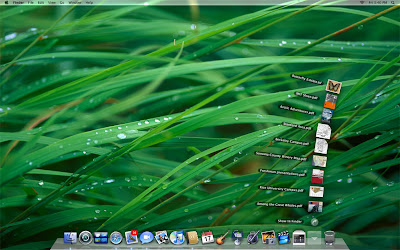
The new look of Leopard showcases your favorite desktop image and puts new file Stacks at your fingertips for a stunning, clutter-free workspace
FINDER
Browse your files like you browse your music with Cover Flow
QUICK LOOK
Browse, play, view, and page through your files. Without opening them.
TIME MACHINE
See how your system looked on any given day and restore files with a click.
SPACES
Create up to 16 workspaces to stay clutter-free and organized.
MAIL
Email personalized stationery, take notes, and write to-dos that sync to iCal
iCHAT
Video chat with effects and backdrops, present remotely, and get more from text.
iCAL
Edit events inline and schedule group events with iCal Server
PHOTO BOOTH
Snap and share fun photos, complete with special effects
DASHBOARD
Sync all of your widgets to all of your Macs.
FRONT ROW
Remote control TV shows, photos, and movies on your Mac
DVD PLAYER
Play, control, bookmark, and even edit your favorite DVDs
SAFARI
Browse faster with even more features. Download the beta today
BOOT CAMP
Run Windows on your Mac — faster and easier.